Memory Meets Muscle: Pairing NotebookLM and Claude Into One AI Productivity Pipeline
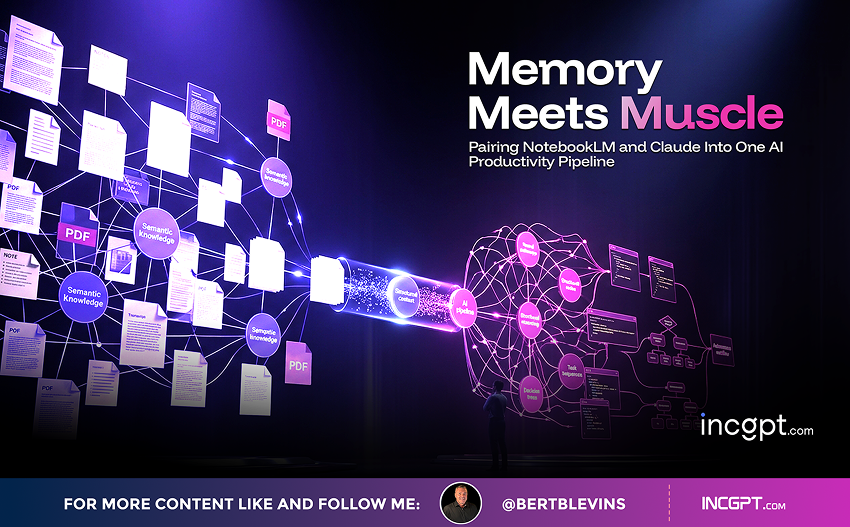
Most people treat their AI tools as separate islands. They research in one, write in another, and design somewhere else, copying and pasting between them and hoping nothing gets lost in the shuffle. Pairing NotebookLM with Claude flips that habit on its head. Used together, they form a single, structured pipeline where one tool remembers and the other executes, and the result is a noticeable jump in both speed and accuracy.
The logic behind the pairing is simple. NotebookLM acts as the memory layer, organizing your research and grounding every output in curated, trustworthy sources. Claude acts as the execution layer, doing the heavy reasoning, automating the repetitive parts, and turning raw material into finished work. One workflow, for instance, has you curate five reliable sources inside NotebookLM and then lean on Claude to produce detailed reports or scripts complete with inline citations, so the output is both fast and verifiable. For anyone juggling content creation, research, or multi-step projects where precision matters, that division of labor is the whole point.
Why the Two Tools Fit Together So Well
NotebookLM and Claude are strong on their own, but they solve different halves of the same problem, which is exactly why they pair so cleanly.
- NotebookLM is the memory layer. It organizes your research materials, keeps your data consistent, and anchors every result in sources you have chosen, so reliability is built in from the start.
- Claude is the execution layer. It generates structured outputs, automates repetitive tasks, and reasons through complex prompts to deliver results you can actually use.
Put them together and you get a workflow that quietly reduces errors and hallucinations, because the system is always working from grounded material rather than guessing. That makes the combination especially valuable for precision-heavy work like content production, research, and project management, where being fast is only useful if you are also being accurate.
What's New in NotebookLM
Recent NotebookLM updates have widened what the tool can do, and they matter for this pipeline because they expand the range of finished formats Claude can help you produce.
- Gemini 3.5 Flash brings a real step up in processing speed and overall capability, so results come back faster and more efficiently.
- Expanded output modes now cover nine distinct formats, including audio overviews, cinematic video summaries, mind maps, slide decks, infographics, data tables, and flashcards.
Together these upgrades let you tailor the final output to the specific job in front of you, whether that is a quick study aid or a polished visual deliverable, with far more flexibility than before.
Workflow One: Streamlined Content Creation
This is the entry point, built for anyone who needs to turn out high-quality content quickly and consistently. It runs in two moves.
- 1. Curate five reliable sources. Pull together PDFs, videos, articles, or your own notes inside NotebookLM so everything you produce is grounded in accurate, relevant material.
- 2. Generate with structured prompts. Use Claude to turn those sources into reports, YouTube scripts, social posts, or podcast outlines, each carrying inline citations for credibility.
The payoff is consistency and accuracy, which makes this ideal for content creators, weekly publishers, or anyone on a regular production schedule. By handing off the repetitive work, you free yourself to focus on sharpening the message and connecting with your audience.
Workflow Two: Design Automation for Visual Content
If your work leans visual, this workflow uses Claude’s reasoning to write detailed design briefs that drive NotebookLM’s infographic tool. It also runs in two steps.
- 3. Specify the design in your prompt. Define the layout, color palette, and information hierarchy so the brief guides the visual rather than leaving it to chance.
- 4. Generate the finished visuals. Produce polished infographics, visual summaries, or other design-heavy outputs tailored to exactly what you need.
This is the fastest route to professional-quality visuals for presentations, reports, or marketing materials, and it lets you deliver compelling design work without needing advanced design skills of your own.
Workflow Three: Automated Pipelines for Efficiency
This is where automation takes center stage, built for recurring tasks and multi-channel content that would otherwise eat your day.
- 5. Pair Claude's Chrome extension with NotebookLM. Automate processes such as competitor analysis, daily news summaries, or content repurposing so they run with minimal hands-on effort.
- 6. Run several projects at once. Set up workflows that handle multiple streams in parallel, squeezing the most output from your time.
This one suits advanced users managing complex or multi-channel work. By automating the routine layer, you reserve your attention for strategy and creative problem-solving, the parts that genuinely need a human.
Extra Tools That Extend the Pipeline
A few complementary tools add depth and reach to the core NotebookLM-and-Claude setup.
- SciSpace integration opens access to verified academic papers and accurate citations, which is invaluable for research-intensive projects.
- The Cortex extension lets you bulk-import browser tabs straight into NotebookLM, streamlining how you gather and organize material.
- Cinematic video overview turns dense research into engaging visual summaries, well suited to internal presentations and team briefings.
Each of these widens what the pipeline can handle, letting you take on a broader range of tasks with more ease and precision.
Limitations Worth Keeping in Mind
The pairing is powerful, but it is not magic, and using it well means respecting a few real constraints.
- Output quality depends heavily on the sources you curate and the prompts you write. Weak inputs produce weak results.
- NotebookLM can still generate inaccuracies, so critical information should be verified before anything is finalized.
- Some features, such as cinematic video overviews, are better suited to internal use than to polished, public-facing content.
Knowing where the edges are lets you get the most out of the tools while sidestepping the common traps.
Which Workflow Should You Start With?
The right entry point depends on what you are trying to accomplish.
- Workflow one fits beginners and weekly publishers who want efficient, consistent content creation.
- Workflow two suits professionals who need high-quality visuals and an automated design process.
- Workflow three is for advanced users running multiple projects or channels who want automation doing the heavy lifting.
Choose the one that matches your goals and you can sharply cut manual effort while raising the quality of what you ship, across nearly any format. Whether you are a content creator, a researcher, or a project manager, NotebookLM and Claude together give you a genuine framework for working smarter and faster, with memory and execution finally pulling in the same direction.